why use F# for scripting and automation?
i've been writing F# for a while now, and i keep coming back to it for scripting and automation tasks. not because it's trendy (it definitely isn't), but because it genuinely makes my life easier. let me explain why.
the type system actually helps
most scripting languages give you freedom at the cost of runtime surprises. and in my experience most of the bugs aren't in the code itself, but come from the world changing around you. data formats change, protocols change, dependencies change - the ground is not stable. with F#, you can revisit a script you wrote years ago and be confident that it either works, or within a minute you will know exactly which part needs updating.
and "works immediately" is not what we want either - if the world changed, then the script should change too. if something broke, you get a red squiggly line as feedback instead of a silent failure or worse, corrupted data. and for the recent LLM craze - your editor will feed these errors back into the LLM, an important reality check to get things right on its own.
pipelines feel natural
the pipeline (|>) operator has a very low cognitive load. you read everything left to
right, top to bottom. the data flows in the same order. you forget everything else and just focus on two
things:
- what do i have now
|>what do i want next
now in python, you genuinely do not know if the data flows left, right, top, or bottom. look at this little snippet, don't try to understand it, just try to figure out where the data is flowing:
b = [(0,1), (1,2), (2,3)]
c = [
    (lambda p: ((u := p[0], v := p[1])[1])
        if (p[0] % 2 == 0)
        else ((lambda w: (w[0] * 10, w[1] * 10))(p))[0]
    )(q)
    for q in ((lambda x: (x[0] * 2, x[1] * 2))(x) for x in b)
]
in the first line we define some data - so far so good. but in the second line,
we have to figure out where this data is moving. is it going into q or p or w or x?
is it going into the inner lambda or the outer lambda? is it going into the list comprehension or the generator expression? is it going left to right, or right to left? is it going top to bottom, or bottom to top? has someone defined a function in the bottom of the file that changes the behavior of this code? you have do all this mental gymnastics in your head at once, and it's okay if if you give up trying to read this little challenge. the point is i like the safety net of guarantees and predictability and python to me reads like hebrew - both in the way it's right to left, and also because i can't read hebrew.
this above was an extreme example, but the idea of unpredictable data flow is built into the core features and mindset of python - you just write things in random order. and a special mention to deeply nested ternary expressions going then-if-else-then-if-else. i've seen lots of code like this in the wild and i'm sure you have too. ternary expressions exist in C-derived languages as well, and you may even argue that they're great (as-in preference of expressions over statements), but the problem is that the solution is patched on top of an existing language that wasn't designed for them from the ground up.
the idea of pipelines has been around since the early days of ML and Unix, F# started popularizing |> in the early 2000s and since then many languages have adopted this style, including OCaml, Elixir, Julia, R, Elm and perhaps some time even javascript. in pipeline-style, the above code never forces you to look back. by the time you reach the next |> you can forget the previous line completely - it doesn't matter how the data got there.
[ (0, 1); (1, 2); (2, 3) ]
|> List.map (fun (x, y) -> (x * 2, y * 2))
|> List.map (fun (x, y) -> if x % 2 = 0 then y else x * 10)
|> printfn "the result is %A"
now consider this example of querying a weather forecast, getting the daily highs and lows, and printing them out:
// weather.fsx
#r "nuget: fsharp.data, 6.6.0"
open FSharp.Data

[<Literal>]
let API_URL =
    """https://api.open-meteo.com/v1/forecast?latitude=59.4165&longitude=24.7994&hourly=temperature_2m"""

type api = JsonProvider<API_URL>
let api_response = api.Load(API_URL)

let temps_by_date =
    Seq.zip api_response.Hourly.Time api_response.Hourly.Temperature2m
    |> Seq.groupBy (fun (time, _) -> time.Date)

temps_by_date
|> Seq.iter (fun (date, times_and_temps) ->
    let date_formatted = date.ToString("yyyy-MM-dd")
    let temps_only = times_and_temps |> Seq.map (fun (time, temp) -> temp)
    let daily_highest = temps_only |> Seq.max
    let daily_lowest = temps_only |> Seq.min
    stdout.WriteLine $"{date_formatted}: {daily_lowest}C {daily_highest}C")
there's a number of things that make this nice to work with:
- the script contains all the code you need to run it, including
dependencies and versions. you can save it anywhere on any platform or
architecture and run it with
dotnet fsi weather.fsxand it will output the forecast (which you can see below). copy it as a one-off script to a server and run it. it is a self-contained unit, i cannot stress this enough.
❯ dotnet fsi weather.fsx
2026-02-03: -9.5C -6.5C
2026-02-04: -17.1C -8.2C
2026-02-05: -18.8C -10.0C
2026-02-06: -15.0C -8.9C
2026-02-07: -11.4C -7.9C
2026-02-08: -10.9C -7.5C
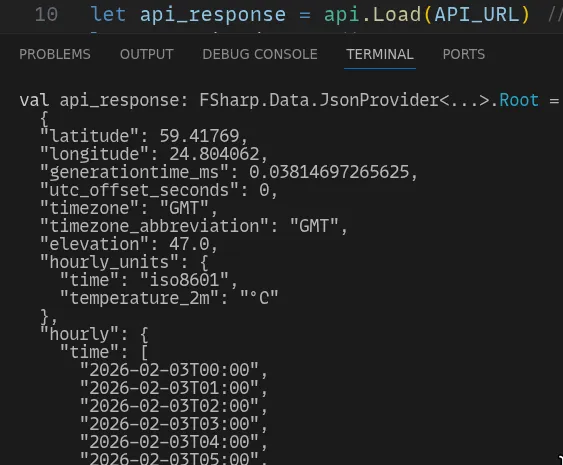
2026-02-09: -13.0C -7.6C- you can execute each line one by one, inspecting values as you go.
forgot how formatting works? want a calculator for 65536*8? want to see the full
api_response? just hit
Alt+Enteron that line and there you go, this is what the next step of the pipeline has to work with:
- every single step is strongly typed without annotation. if you change
#r "nuget: fsharp.data, 6.6.0"line to#r "nuget: fsharp.data, 6.5.0"and the library changes in a breaking way, it points to where it broke immediately. if the API endpoint changes and the temperature field is renamed, the editor immediately lets you know. and what fields are available? you don't even need to look at the response - the editor completes them for you. it's seamless, it's instant, and it just works.
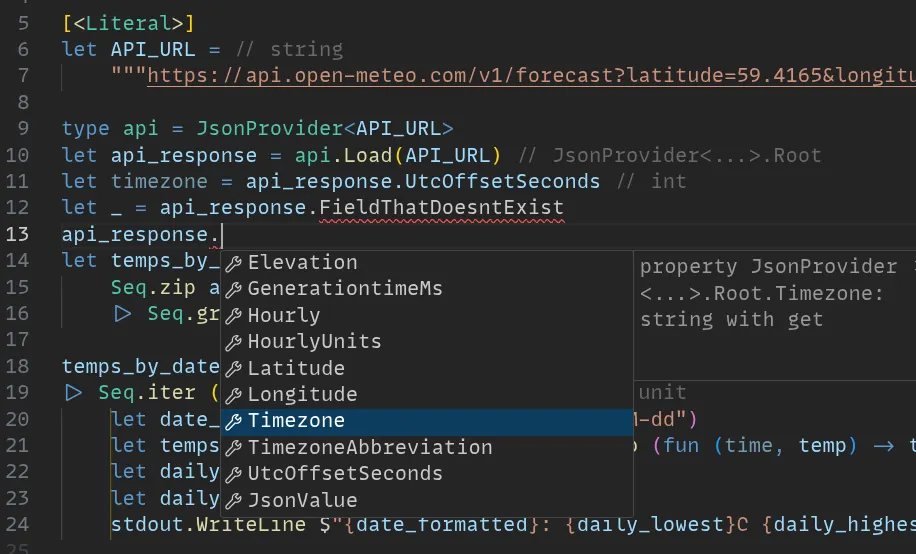
and where do these fields come from? the JsonProvider (line 9) generates
them automatically from the URL, by querying the API once in the background,
as you're typing. you can point it to a lot of different sources - local json
files, csv files, xml files, excel files, live database connections, and more.
it's a personal code generator that always knows the latest schema and doesn't
hallucinate. in F#, this is called a "type provider", and it's one of the killer
features of the language for scripting.
the utility of a language is exponential in the number of users
F# runs on .NET, which means you have access to a massive ecosystem of libraries
and tools. need a fast HTTP server? aspnetcore*if you want a full aspnet server running from a single .fsx script, then you can use this script from TheAngryByrd/IcedTasks to generate a list of all dependencies. want authentication
for your app? OAuth2 libraries are available for all major providers. need
to manipulate images, audio, video, or work with databases? there's a library
for that. and because F# compiles to the same IL as C#, you can use almost any
.NET library out there, with the same performance as C#, over 20 times faster
than python for many tasks. another advantage is that C# has an enormous and
well-maintained standard library, which F# can use directly, so you can write
many applications without needing third-party libraries at all.
performance
F# is not an interpreted language even if it feels like one. when you run a single line in fsi, that line of code is compiled to machine code on the fly using the same optimizing JIT compiler as C#. i will not go as far as to say it's "fast as C" - but that's not the competition here. if you want the absolute highest performance possible, then you should write a C program and perhaps even hand-optimize it in assembly - no amount of .NET wizardry will beat that. but writing in a faster language will not be as smooth as F#, and you're forced to think about what memory is reused where, lifetimes, ownership, etc, and most importantly, there's no interactive development experience like fsi - it's a higher cost to pay to get started.
F# gives you 50% of native performance by writing 10% of the code. The real
competition of F# is python, bash, and other scripting languages - and in that
regard F# will run circles around them for CPU bound tasks, while being just
as easy to write and easier to maintain. carefully written F# scripts
can rival native code performance for many tasks, but at the cost of writing
something that looks more like "F# flavored C" and a clunky interop layer. i've
done benchmarks for a number of algorithms in my research work, and F# is often
within 2x of C or C++ implementations. the
main culprits for unavoidable performance loss are worse defaults, e.g., utf16
strings instead of utf8, which can be mitigated by switching to Span<byte> and
similar types when needed. as for garbage collection and allocations,
the key is to allocate everything up front and reuse buffers,
which is a common practice in high-performance .NET code.
startup time
app startup time is one of the major downsides of using .NET - cold starts can take a second, which is not ideal for scripts. as an anecdote, i remember running Visual Studio 2015 on a project which took more than 2 minutes to start up, which can be attributed to first compiling the compiler itself, then compiling every library on earth and only then running the actual application. you do this every single time you start the application.
fortunately modern .NET has two solutions for this, that will get you startup times faster than a scripting language, but not as fast as a compiled binary like C. first option is ReadyToRun compilation, which precompiles most of the framework and libraries ahead of time, so the JIT has less work to do at runtime. you can enable this by turning your script into a project and passing -p:PublishReadyToRun=true to dotnet publish. this can get startup times down to unnoticeable levels for many applications.
the second solution is to compile down to real native code using NativeAOT, which removes the JIT entirely. this is still a bit rough around the edges for F#, as some features are not supported (reflection, dynamic code generation, etc), but for tasks where you don't need those features, it's a great option. you can enable this by passing -p:PublishAot=true to dotnet publish. NativeAOT has startup times close to native binaries.
the third option, although less supported, fflat, or fsnative when it matures, will compile F# code directly to native code without going through the .NET runtime at all, which will give you the best possible performance, but at the cost of losing access to the .NET ecosystem. i'm personally the author of fflat, and i use it for small utilities and command-line tools where i already have a working script in F# and want to turn it into a standalone binary. fsnative is more ambitious and aims to port F# to LLVM, which would give you access to a wider range of platforms and better optimization opportunities, but it's still in early stages.
script to native binary
as a little native example, fflat can turn our example weather script into a native binary with no dependency on dotnet at all, though beware - some .NET libraries, including the JSON parser used by JsonProvider in the example, will produce tons of AOT analysis warnings while compiling, as they're using reflection under the hood. (and since the api.Load call links
to brotli and libz for decompression, i also make sure it is installed)
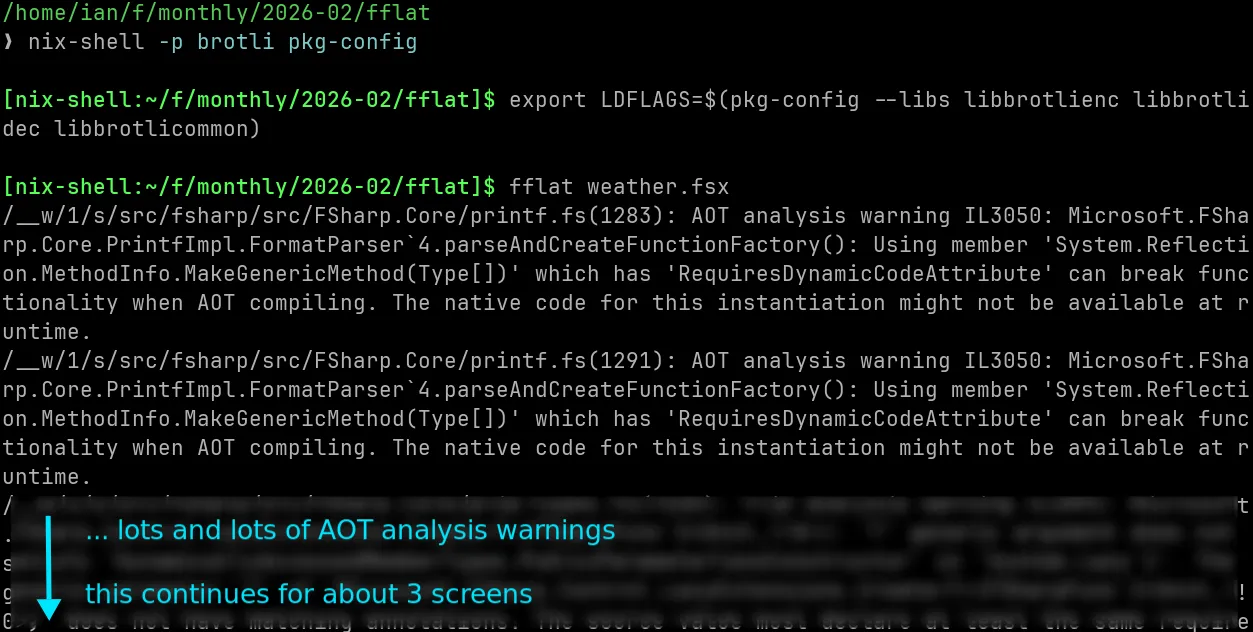
but those are warnings, not errors - and in the end we still produced a working native binary, that's dynamically linked to libc and a couple of other native libraries (below).
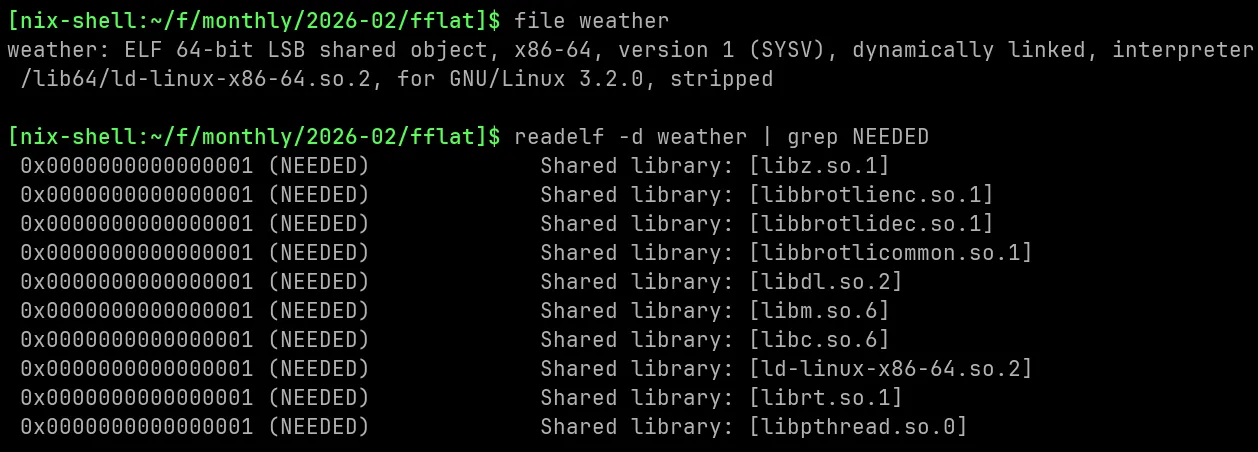
and as you might expect, the native binary works just like the script, but with much faster startup time and lower memory usage, and doesn't require .NET to be installed on the machine.
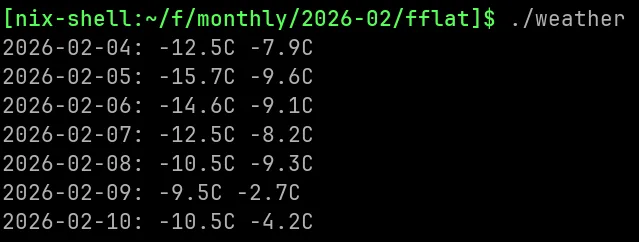
since the FSharp.Data library uses reflection, printfn, generic recursion and other features that are not AOT friendly, the binary size is a bit larger than ideal, but still reasonable for a native binary (9MB). with some more care taken to avoid reflection and dynamic features, the binary size can be reduced further. for comparison, a minimal "hello world" F# program compiled with fflat produces a binary of about 1MB, or if you are willing to leave out the standard library completely, the bflat compiler,
that fflat runs on top of can produce binaries starting at a couple kilobytes and even run on bare metal (!!).
tooling
the F# ecosystem has been mature for years now. ten years ago, the lead designer of C# and architect of .NET, said in the the .NET language strategy
... We will make F# the best-tooled functional language on the market, by improving the language and tooling experience, removing road blocks for contributions, and addressing pain points to narrow the experience gap with C# and VB. As new language features appear in C#, we will ensure that they also interoperate well with F#. F# will continue to target platforms that are important to its community.
and ten years later i think this is true.
maybe in terms of language features it still needs readonly static and allows ref struct to be truly on par with C#, but in terms of tooling, it's definitely there.
i've tried a lot of functional languages, and tooling experience you get in F# is closer to C# and Java than to Haskell or OCaml.
now F# clearly isn't an absolute top priority for Microsoft, and say what you will
about my university teams tab taking 1.1 gigabytes of memory (really) and how busy they are with pushing "software-as-a-shitpost"i hate teams so much. it's such a piece of crap and i don't think there's anything being done to improve it on all fronts instead, but on the other hand
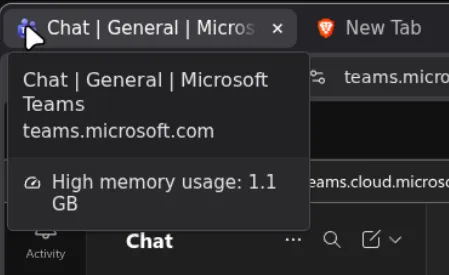 i have a lot of appreciation for supporting a niche language like F# for so long, and the tooling experience is a big part of that. the fact that F# has the latest .NET features, and that the language itself is still being actively developed and improved, is a sign they care about the language and its users.
the best experience for me is with vscod(e|ium) + Ionide, which gives you autocompletion, inline errors, refactoring tools, and more.
The same language server in vscode (FsAutoComplete) can also be used with neovim, emacs, and my recent favorite, helix. if you prefer a more heavyweight IDE, Rider is excellent, albeit takes a while to start up, so not as good for scripts. for command-line, dotnet fsi is all you need - it's included with the .NET SDK and works out of the box. Visual Studio also had great F# support out of the box when i last used it, but i haven't been using windows for a while so i can't comment on the experience today.
ecosystem size
F# is a niche language. but for scripting and automation tasks, the ecosystem size matters much less than the ability to interop with .NET libraries. if you need a library for something specific, there's is already a .NET library for it that you can use directly from F#. and if not, that's a .NET problem, not an F# problem. For machine learning, i would still recommend using Python or Julia, as the ecosystem there is much larger. but for everyday scripting and automation tasks, i haven't seen another language that combines ease of use, robustness, performance, and maintainability as well as F# does.
verdict
overall .NET is a blessing and a curse, but the language itself is very well designed and checks a lot of boxes for me. and this message from the F# group on Discord puts it the best:
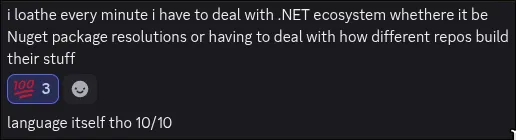
anyway if you haven't tried F# yet, give it a shot for your next scripting task. you might be surprised how much you like it
i'll follow up in the future with some more specific topics.